
How to Build a Custom Knowledge Chatbot with LangChain
Create a chatbot that allows us to chat with PDFs.

Hey there 👋
Let’s code and build a chatbot from scratch, as a web app, which uses PDFs for us to query. No previous coding experience is required, as you can copy/paste mine. If you’re really curious, paste the code into ChatGPT and get it to explain what it does :)
🧠 What you’ll learn
How to use Open AI’s GPT-3.5 API for prompts and completions
How to use Langchain, a framework for connecting LLMs to other sources of data, such as the internet or, as in this case, your personal files
How to use Google Colab, a free Jupyter notebook that runs entirely in the cloud, allowing us to write and execute Python code through the browser
Don’t worry about the jargon, I’ll explain it as we go through. I’m not a coder by trade, or a data scientist, so I’ve had to learn all this from pure immersion, just as you are now.
All of the code will be available at the end, so you can reference it with your own projects, and copy/paste it if you wish.
💎Why it matters
ChatGPT can only access the data it’s been trained on (plus any data which some plugins might enable). We want to use a specific dataset that we can “interrogate”, i.e. chat with.
We can’t use ChatGPT, as its context window is only 4k tokens (GPT-3.5) or 16k tokens (GPT-3.5-16k). An LLM’s context window is the the amount of information the model takes in and its response to you. One thousand tokens is equivalent to around 750 words, so to put that into context, 4k tokens is about 5 pages of text.
Data shared using OpenAI’s API is not used for training their model, so is ideal for documents or any data which we want to keep to ourselves. (More details from OpenAI here.)
Furthermore, we may want to access data that is not part of the LLM’s training material. For example, the GPT-3.5 model is only trained on data up to the end of September 2021.
The ability to put additional info into LLMs and query it open ups enormous possibilities, not just for internal tools in the workplace, but for whole new businesses too.
🛠️ Our tech stack
Open AI account - link. This is free to set up - you get some credits to start you off then pay on a ‘per token’ basis. More details on their pricing here.
Open AI’s text embedding model, text-embedding-ada-002 - link.
LangChain - link (free). We’ll go through the set up of this below.
Google Colab - link (free).
⏱️ Time to build
~30 minutes to get everything set up, run the demo, and edit the relevant parts of Google Colab file for your use case.
So, we want to build a tool which lets us chat with our PDFs, via a Large Language Model. Let’s get started.
🦜🔗 An intro to LangChain
There are various methods we could use for this build. We’re going to use a framework called LangChain. It launched in October 2022 and is incredibly popular; it already has over 58k stars on Github (a lot!). It’s also relatively straightforward to set up (once you know how), so it’s perfect for ShipGPT’s maiden voyage!
Let’s take a look at the process that LangChain is going to be helping us with.
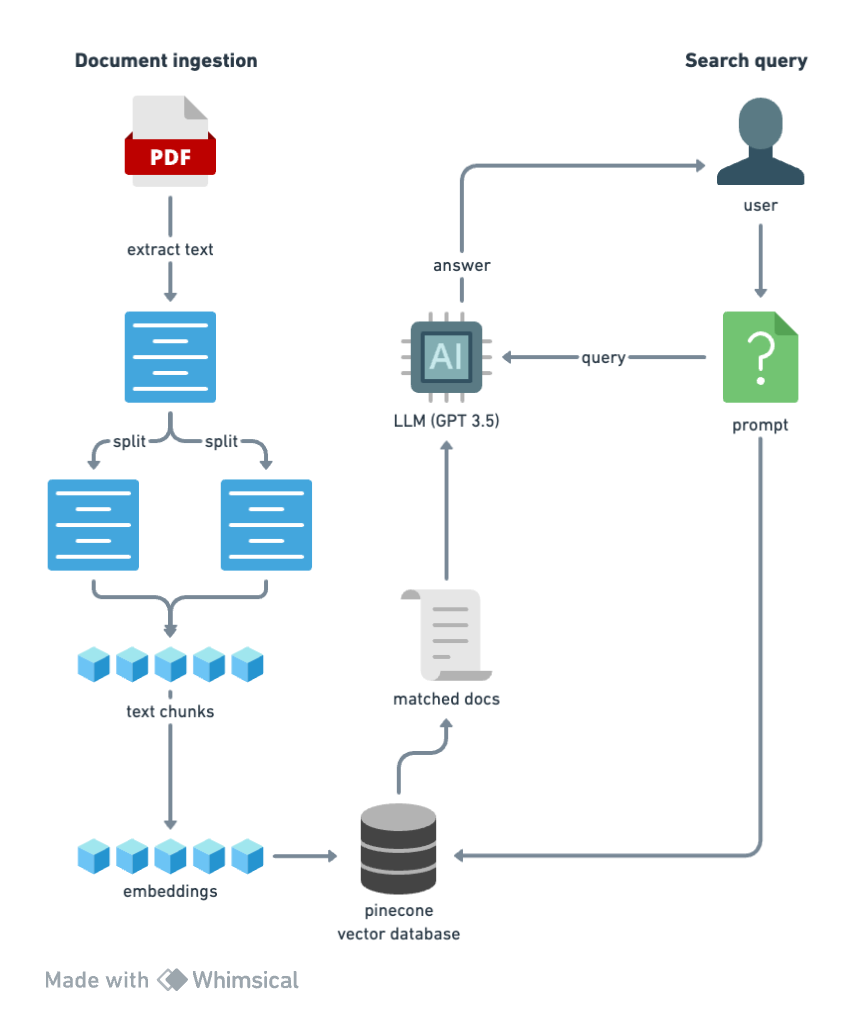
Let’s explain this process step by step.
We take the doc and split into smaller pieces or “chunks”. We do this so that when we are recalling ti and querying the data in order to get an answer based on the document, we need to receive a bunch of smaller chunks that are relevant to that query - and not just the entire mass of information.
We’re going to chunk our document down in to however many are needed in order to get them below 512 tokens each (the embedding model, which we’ll come on to shortly, works best with either 256 or 512 token chunks).Then we’ll take the chunks and embed each one of them one by one. We’ll use the ada-002 model from OpenAI for this. It’s simply one of the best embedding models available. Embedding turns the text into numbers which makes it possible to store those words which are related in some way, together.
Then we’ll take all these embeddings for each chunk and put them into a vector database, so that they’re ready for recall when the prompt comes in from the user.
We’ll take in the user’s prompt or query, put it through the same embedding model, and query the vector database, along with sending it as context to the LLM.
This returns a number of documents that are most similar to what the query was related to, and we pass these to a LLM and include it in the context.
Basically we’re asking the LLM, “can you answer this question, given this context?”, and send the answer back to the user. Which sounds simple, but I wanted to show what’s happening behind the scenes so that you get an understanding for how all this works.
🧑💻 Installs, Imports and API keys
OK, on to the coding part.
‼️ Copy this Colab notebook to your Google drive: link. If you already use Gmail you’ll save it to your existing drive; if not, you’ll need to set an account up. Just in case you can’t access this for any reason, I’ll include the code here. But you should just be able to follow the instructions in the notebook itself, and run the code as you go.
Run this code (by simply hovering over the cell in the notebook and clicking on the Play icon):
!pip install -q langchain==0.0.150 pypdf pandas matplotlib tiktoken textract transformers openai faiss-cpuThen run the next cell:
import os

import pandas as pd

import matplotlib.pyplot as plt

from transformers import GPT2TokenizerFast

from langchain.document_loaders import PyPDFLoader

from langchain.text_splitter import RecursiveCharacterTextSplitter

from langchain.embeddings import OpenAIEmbeddings

from langchain.vectorstores import FAISS

from langchain.chains.question_answering import load_qa_chain

from langchain.llms import OpenAI

from langchain.chains import ConversationalRetrievalChain
Now insert an OpenAI API key, replacing {YOURAPIKEY} - and that means remove the { } braces as well. (To get this, go to platform.openai.com, click on your profile and select “View API Keys”.)
os.environ["OPENAI_API_KEY"] = "{YOURAPIKEY}"📄 Loading your PDFs and chunking with Langchain
Now add your PDFs. Add the file(s) to the local notebook Files folder (left hand side of the screen).
There are a couple of sample files I’ve added for you to trial that chatbot first. At nearly 200 pages of complex AI/ML research, it’s the kind of content I would just never read or even comprehend, but is highly regarded so… an ideal use case!
To chunk the text, run the next piece of code, replacing the PDF filename with your own:
# Step 1: Convert PDF to text
import textract
doc = textract.process("./attention_is_all_you_need.pdf")

# Step 2: Save to .txt and reopen (helps prevent issues)
with open('attention_is_all_you_need.txt', 'w') as f:
    f.write(doc.decode('utf-8'))

with open('attention_is_all_you_need.txt', 'r') as f:
    text = f.read()

# Step 3: Create function to count tokens
tokenizer = GPT2TokenizerFast.from_pretrained("gpt2")

def count_tokens(text: str) -> int:
    return len(tokenizer.encode(text))

# Step 4: Split text into chunks
text_splitter = RecursiveCharacterTextSplitter(
    # Set a really small chunk size, just to show.
    chunk_size = 512,
    chunk_overlap  = 24,
    length_function = count_tokens,
)

chunks = text_splitter.create_documents([text])
Actually what’s happening here is we’re using textract which will extract all of the information out of the pdf. Then we’re saving that as a .txt file. This just saves issues that could happen with different doc types that we might use. Then we’re using LangChain’s text splitter.
We can see how any chunks were created by running this:
type(chunks[0])By hovering your cursor over the cell, you’ll see how many chunks there are:
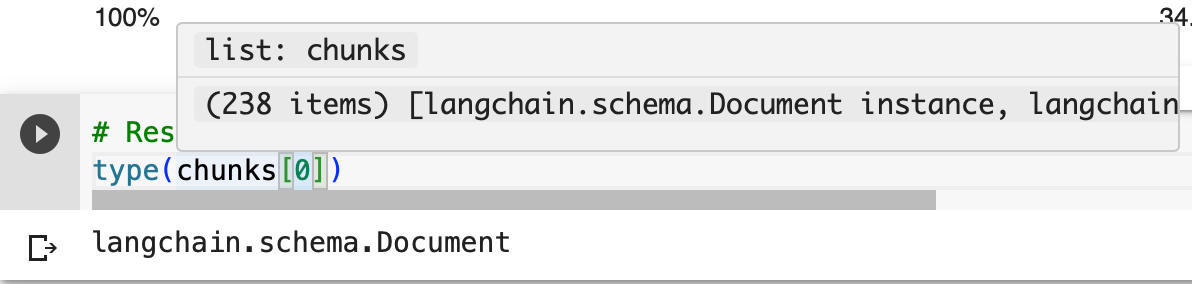
Chunk size is actually a really important factor, to determine the quality of the output, so we can run a quick data visualisation here, to check the chunking performed well:
# Create a list of token counts
token_counts = [count_tokens(chunk.page_content) for chunk in chunks]

# Create a DataFrame from the token counts
df = pd.DataFrame({'Token Count': token_counts})

# Create a histogram of the token count distribution
df.hist(bins=40, )

# Show the plot
plt.show()
which will show something like this:
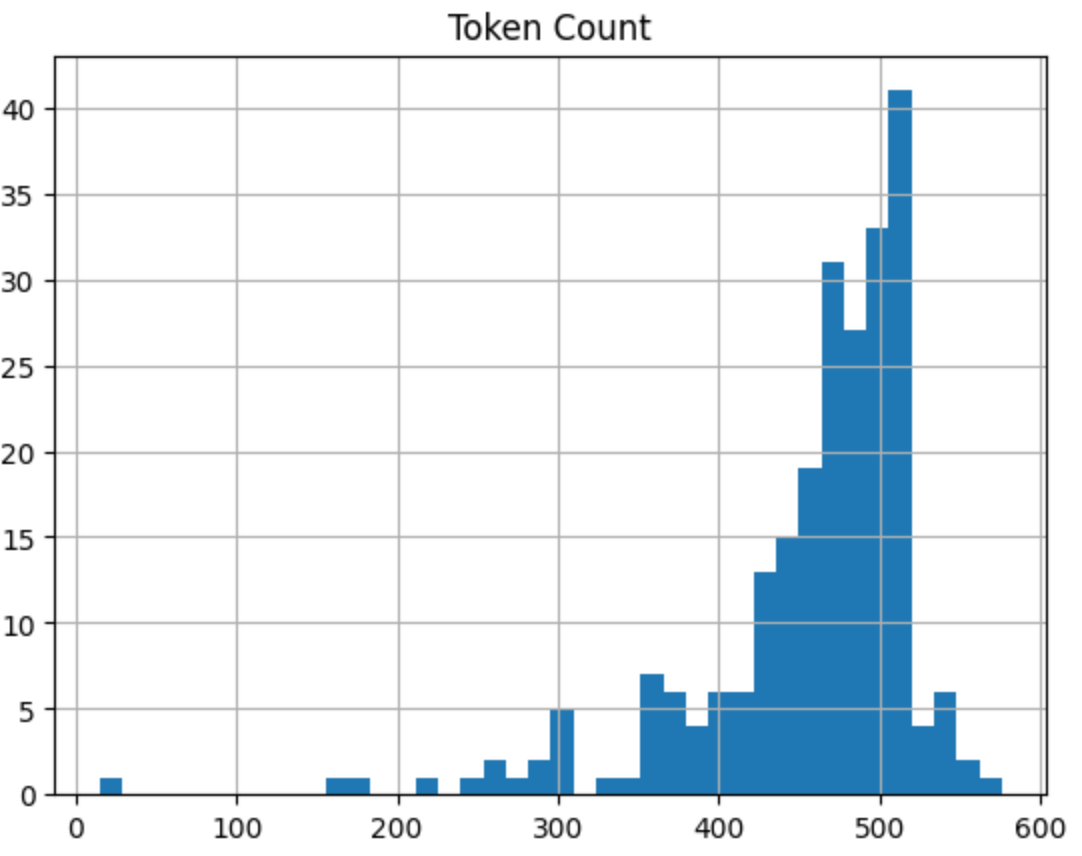
You can see from the code that we’ve set the token limit in a chunk to 512, with overlap of 24. From the visualisation we get, most are around the 512 token level and below. Seems like a good run.
🗄️ Set up embeddings model and vector database
LangChain makes this super simple. There’s something called an FAISS package which we can use.
We take in the text chunks we created and use the embedding model to embed and store all of that in a vector database.
Run this:
# Get embedding model
embeddings = OpenAIEmbeddings()

# Create vector database
db = FAISS.from_documents(chunks, embeddings)
This will check that what we’ve done so far is working! It’s using a prompt which you can edit, “Why do LLMs output information they know to be false?”, and runs a similarity search on the database.
Then we take in that functionality we’ve created, and combine it with a LangChain “prompt template”, taking in the prompt (query) and the context gained from the similarity search, and uses OpenAI to give us an output:
LLMs can output false information if the pre-training data they were trained on contains inaccuracies or becomes outdated with time.
💬 Create our Chatbot
So finally we’re ready to create our chatbot. We can use another LangChain component, something called a Conversational Retrieval Chain. You can set the temperature here too (temperature governs the randomness and thus the creativity of the responses. It is always a number between 0 and 1). I’ve set it to 0.3 here as this is a highly complex research doc, and I want to get responses back in language that is more everyday than that in the PDF:
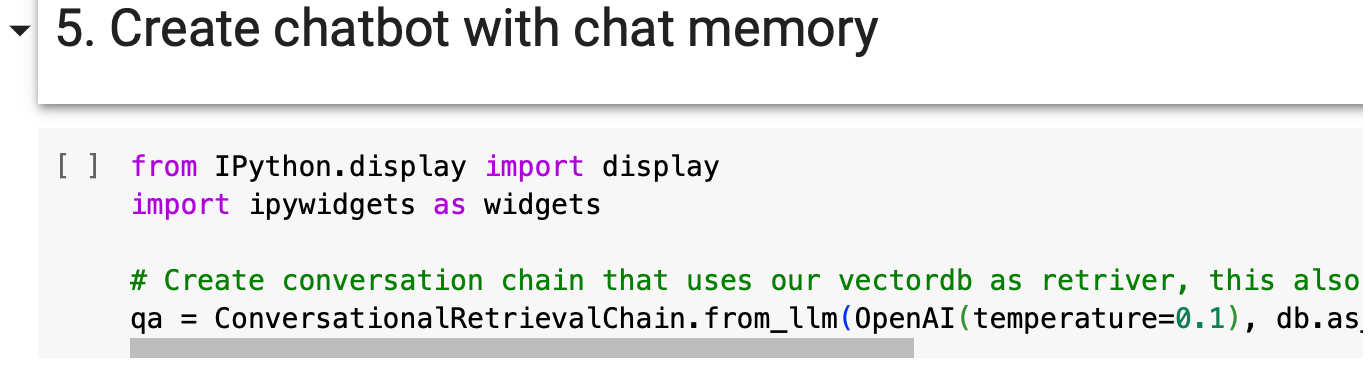
Then in the chat conversation window, we can submit our prompt and get our output back - and it has chat memory built into it too:
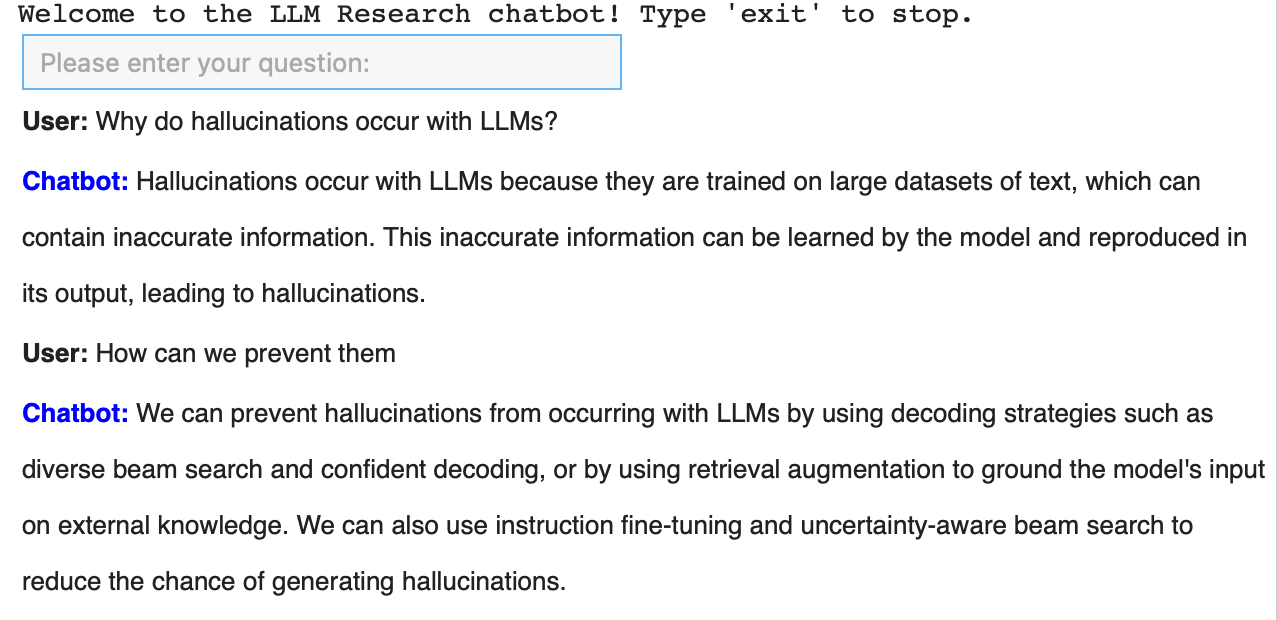
🎉🎉🎉 And there we have it! We’ve built a custom knowledge chatbot, using Langchain, which takes in our PDFs, chunks them up, embeds them, creates a vector store, then allows you to retrieve them and answer questions based on that information.
That’s it for this week. How did you find it?
If you have any suggestions for future tutorials, hit reply to this email and let me know. If you have any questions and you’re a paid subscriber, hop onto the private Slack.
My AI Consulting Services
👋🏼 Want to speak with me about your project? Book an initial discovery call here: link.